
SignPack3.0.1 - Download
You'll be able to download in few seconds.
Publisher Description
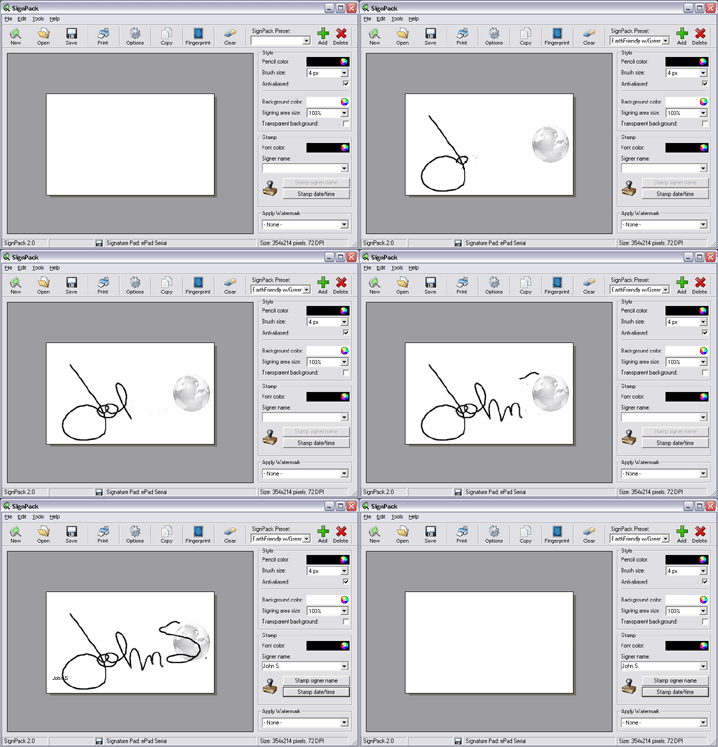
SignPack work with signature pads to capture and secure your digital signature. Capture, secure and produce electronic signatures in a snap. SignPack electronic signature software supports major signature pad brands including Topaz digital signature pads and Interlink e-signature pads.
Conventional digital signature capture solutions packaged with electronic signature pads are very limited and don't provide advanced security features such as digital signature stamping, e-signature file encryption, and password protected start-up like SignPack. SignPack digital signature software also renders a high definition image of your electronic signature, therefore allowing you to resize without quality loses. SignPack's user-friendly interface introduces exciting tools to select the size and color of your pen or brush, choose a custom background color for your electronic signature, or tailored signature stamping options. Copy your digital signature to your clipboard and paste into any production software to be published, edited, emailed or posted online.
SignPack 3 empowers you to achieve optimal security requirements, and is the most comprehensive and convenient electronic signature solution on the market.
- High resolution digital signature capture for easy resize
- 128-bit file encryption for access control
- Signature stamping to provide name of signee and date of capture
- Watermarks to cast down counterfeit
- Command line interface (SDK) to integrate SignPack with your enterprise solution.
SignPack will contribute to streamlining your business processes with efficiency and handiness.
SignPack electronic signature solution has a state-of-the-art signature capturing engine that generates vectorial images rather than the typical bitmap file format. SignPack generates real-life signatures, you will not notice the difference from your pen and paper signature to your SignPack generated electronic signature!
SignPack. Sign with Style.TM
About SignPack
This Office Suites & Tools program is available in English, French. It was last updated on 29 September, 2026. SignPack is compatible with the following operating systems: Windows.
The company that develops SignPack is InnoTechnix inc.. The latest version released by its developer is 3.0.1.
The download we have available for SignPack has a file size of 17.8 MB. Just click the green Download button above to start the downloading process. The program is listed on our website since 2016-12-07 and was downloaded 0 times. We have already checked if the download link is safe, however for your own protection we recommend that you scan the downloaded software with your antivirus. Your antivirus may detect the SignPack as malware if the download link is broken.
How to install SignPack on your Windows device:
- Click on the Download button on our website. This will start the download from the website of the developer.
- Once the SignPack is downloaded click on it to start the setup process (assuming you are on a desktop computer).
- When the installation is finished you should be able to see and run the program.
Program Details
System requirements
Download information
Pricing
Version History
version 3.0.1
posted on 2016-12-07
Windows 10 compatible
New Interface
Scriptel Signature Pad added
Bug Fixed
version 2.0
posted on 2009-09-09
128bits image file encryption for user access control
Finger print capture for optimal security
Watermarks option to cast down counterfeit
Command Line Interface (SDK)
Signature settings presets for speed and efficiency
Windows system tray docking for quick access
Disclaimer
External Download
We do not host SignPack on our servers. We did not scan it for viruses, adware, spyware or other type of malware. This app is hosted by the software publisher and passed their terms and conditions to be listed there. We recommend caution when installing it.
The external download link for SignPack is provided to you by apps112.com without any warranties, representations or guarantees of any kind, so access it at your own risk.
If you have questions regarding this particular app contact the publisher directly. For questions about the functionalities of apps112.com contact us.
